1 of 15

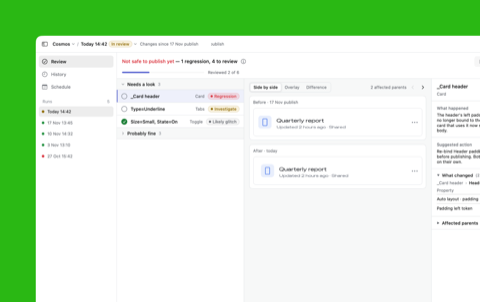
Publish Check reviewing a demo library called Cosmos. A red line says Not safe to publish yet, 1 regression, 4 to review. A Card header change shows before and after side by side, and a side panel explains what happened, the suggested action and the property that changed: auto layout padding left, 16 before, 24 after.
Publish Check reviewing a release, with what changed in one component (demo data)

Library Release Automation

Release tooling and a release process for Salesforce's Figma libraries, from a Changelog plugin to a macOS review app.

Impact

  • With Publish Check, reviewing a library release takes about 20 minutes on average, down from about 3 hours by hand.
  • 300+ teams use the main library that each release goes out to.
  • Each library release carried 200+ component changes to check.

Problem

A peer and I were the release captains for Salesforce's Figma libraries, including the main web components library. We audited and released them weekly, then every two weeks, then monthly as Figma use fell.

Every release was checked by hand: version history, then a sheet, FigJam, a changelog and a Slack post. Change descriptions were unreliable, and a small edit could quietly shift every component that nested it. There was no dedicated engineering for release tooling.

Approach

I built the first release tools, then co-built Publish Check and co-wrote the release process with my co-captain.

  • Changelog plugin. My first build as a designer. It stayed a working prototype and was never published.
  • Release process. A fixed cadence, a cutoff, and Figma version history as the one source of truth. In use across the team today: the release process we co-wrote.
  • Diff prototype. The first version compared component data between versions instead of trusting change descriptions, and used noise rules to cut false alarms. Each change got an impact score from 0–100, marked breaking, major or minor.
  • Changelog entries and announcements. I wrote the entries inside the library and posted the official release announcements.

Publish Check. A macOS app we co-built with Claude Code agents. It shows each change and what moved with it, as evidence a maintainer can act on.

  • Compare. Pick a library, or let a schedule start a review. Each change since the last publish shows side by side, as an overlay or as a difference, with before and after values.
  • Trace. Parents that inherit a change are grouped under one finding.
  • Decide. Mark each finding "Looks right" or "Needs follow-up". When all are accepted, it shows "Ready to publish". Marks carry over while a change stays the same.
  • Announce. Approved changes become changelog notes and a Slack announcement.
  • Publish in Figma. The maintainer owns that step.

Safe by default. Read-only unless asked, changelog writes only for an allowed library with its file open, Slack posts stay a dry run or a private draft until you confirm a send to an allowed channel, AI reviewers can't change the file, a blocked write says how to fix it, and a missing capture shows "Not checked", never a pass.

Setbacks

A later review found that diffing the component data missed cascading changes. When a nested instance changed, the parents that used it moved too, and the diff didn't show that. So Publish Check compares the rendered components as well as the data.

Where it stands

In use.

Publish Check was released recently, and the team has started using it. The next goal is under 2 minutes per library, with more automation and fewer manual approvals.

Time to review one library release

Average per library.

Value
By handabout 3 hrs
With Publish Checkabout 20 mins

More results

  • The main web components library I release holds 258 components.
  • On a test file, the first diff prototype was 90% accurate.
  • A release cycle covered 2 libraries: about 6 hours of checking by hand, now about 40 minutes with Publish Check.
  • In the first diff prototype, noise rules removed about 100k false alarms from the diffs.
  • I posted 20 official release announcements for the library.
Publish Check History for the demo library: five reviews, each with its regressions, number of changes, the publish it compared against and a status such as In review, Ready or Needs follow-up.
Every review compares against the library's last Figma publish (demo data)
Publish notes for Cosmos release 4.3, Changelog tab: six rows for Input, Tabs, Button, Badge, Card and Tooltip, each marked Modified, non-breaking, with a description and date, and a Write to Cosmos changelog button.
Publish notes, written to the library's changelog page (demo data)
Publish notes, Slack tab, addressed to a demo channel. The message and its preview list the changes to Input, Tabs, Button, Badge and Card. Buttons save a Slack draft or do a dry run; live send is off.
The same notes as a Slack announcement draft (demo data)

Manyu Varma

മന്യു വർമ്മ

Thinking beyond just consistency, building design systems at scale through robust yet flexible foundations, strategy and planning, relevant design, and AI workflows.

Highlights
Work

Agentic

Early AI

Pre-AI

Hold Alt or Option to see the spacing.